




Enjoy Free Roaming,
on All Plans with GigaX!
Stay connected wherever you go with free roaming included in every plan

Choose your destination
After choosing your destination, pick the best data plan for your trip – quick setup, instant connection!

















How does GigaX eSIM work?
Before purchasing a GigaX eSIM, it's essential to ensure that your device is eSIM compatible. Here's how to check:
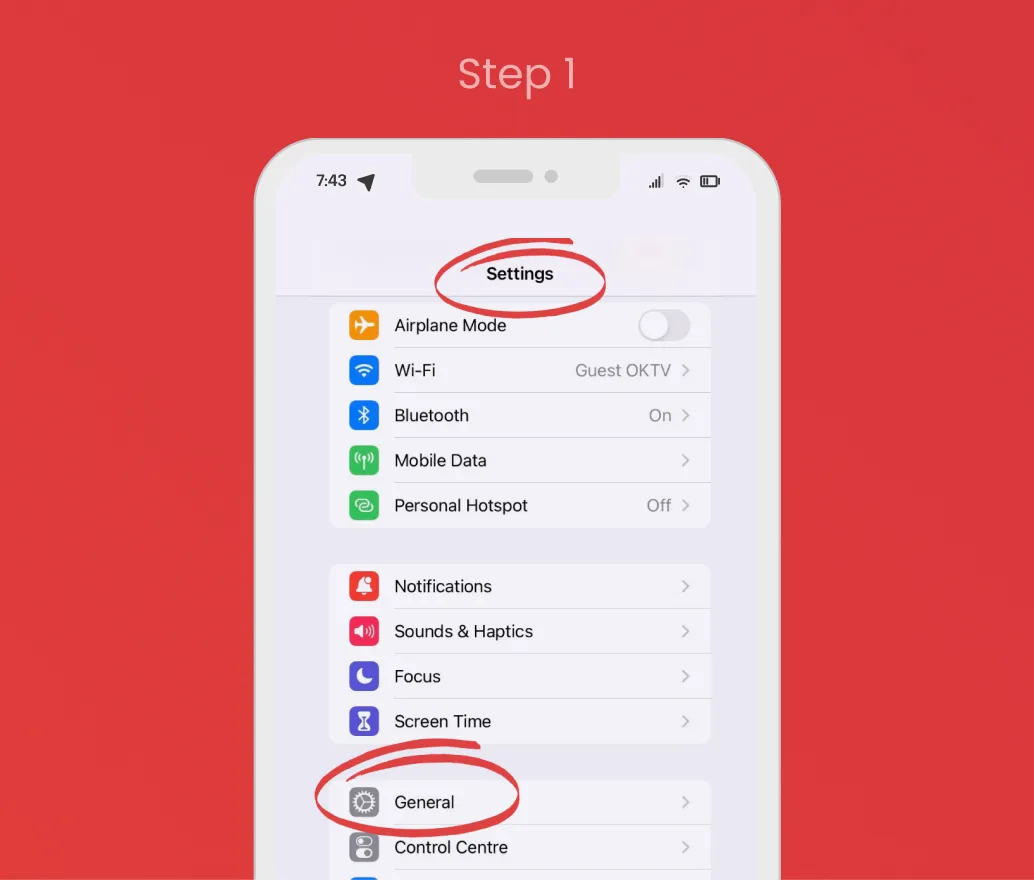
Go to Settings
Open the Settings app on your iPhone and select General.
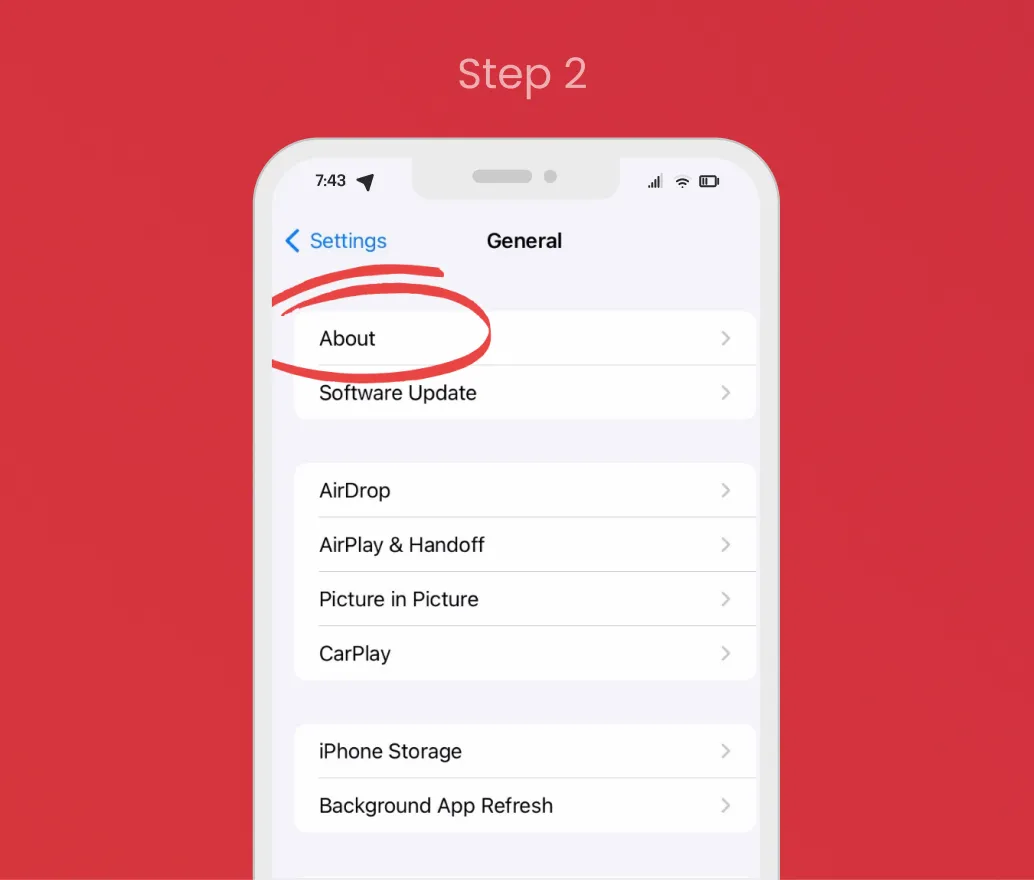
Tap on "About"
In the General menu, tap on About.
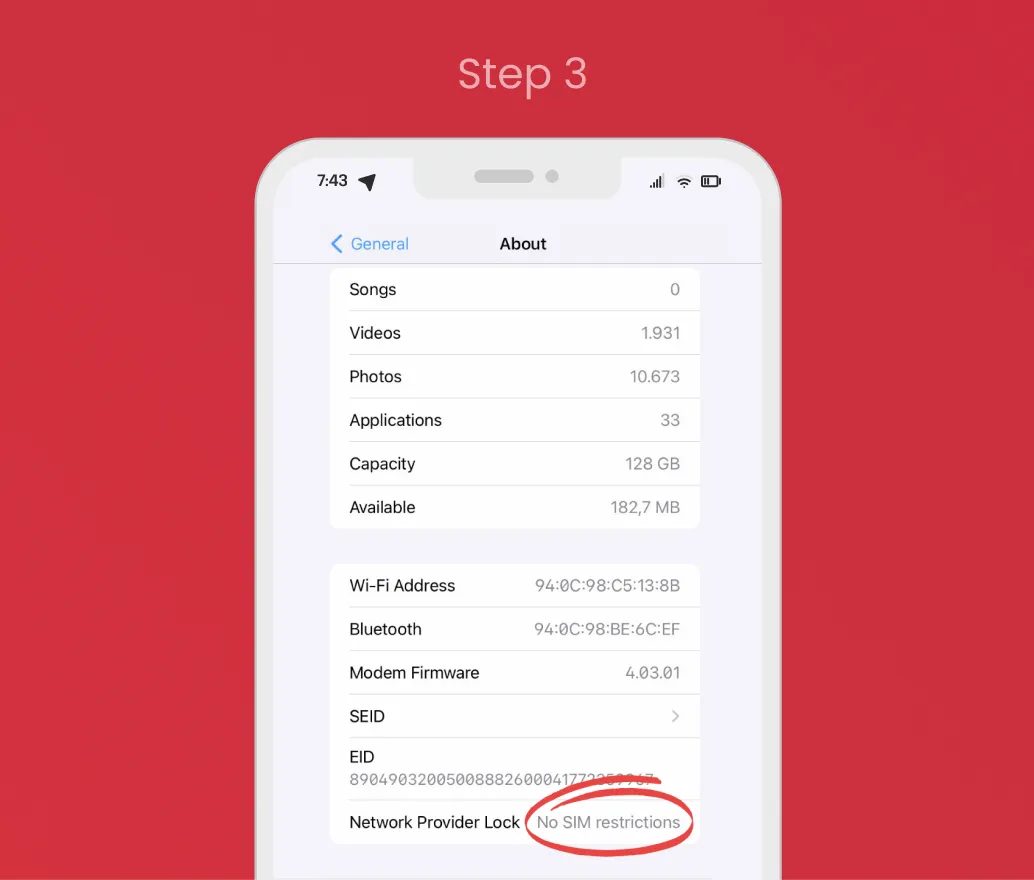
Check Compatibility
Scroll down to Carrier Lock / Network Provider Lock. If it says "No SIM restrictions", your device is eSIM compatible.
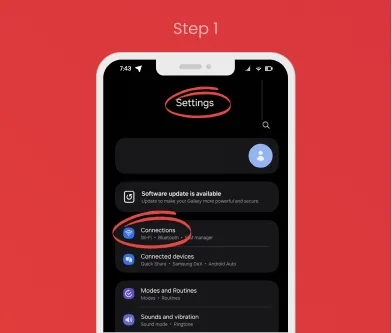
Go to Settings
Open the Settings app on your Android device.
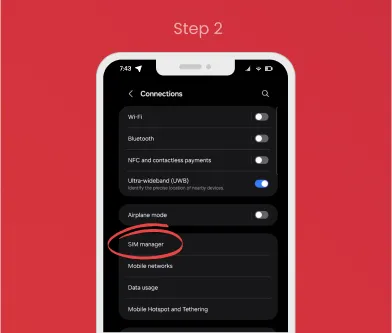
Navigate to Connections
Go to Connections (or Network & Internet on some devices), then tap SIM manager.
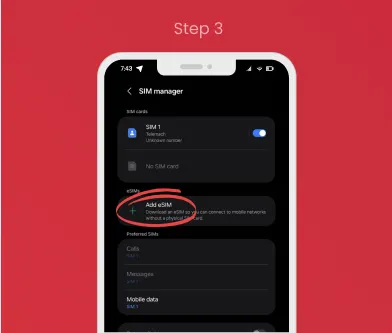
Check Compatibility
If you see an option to Add eSIM, your device is eSIM compatible.
Forget about roaming!

Keep your number while traveling.
With our eSIM, you can access important services linked to your primary number, all while enjoying seamless global connectivity.

Instant activation, no need to wait for shipping.
Say goodbye to waiting for a physical SIM card to arrive. Our eSIM solution allows you to download and activate your data plan instantly, anytime and anywhere.

Affordable data plans in over 170 countries.
Our eSIM offers flexible, affordable plans available in more than 170 countries. Physical SIM card available if needed. No problem! If your phone doesn't support eSIM, you can still enjoy GigaX with a physical SIM card. Available for most unlocked devices with fast delivery and global coverage.

Support 24/7 – We're Always Here for You
No matter where you are or what time it is, our dedicated support team is ready to assist you. From setting up your eSIM to troubleshooting any issues, we're just a message away
Add Accessories to Your eSIM TRAVEL
Enhance your travel experience with our optional tools.
All accessories can be added to your cart during checkout.
Please note: accessories cannot be added directly from the homepage — you will find them as optional offers during checkout.
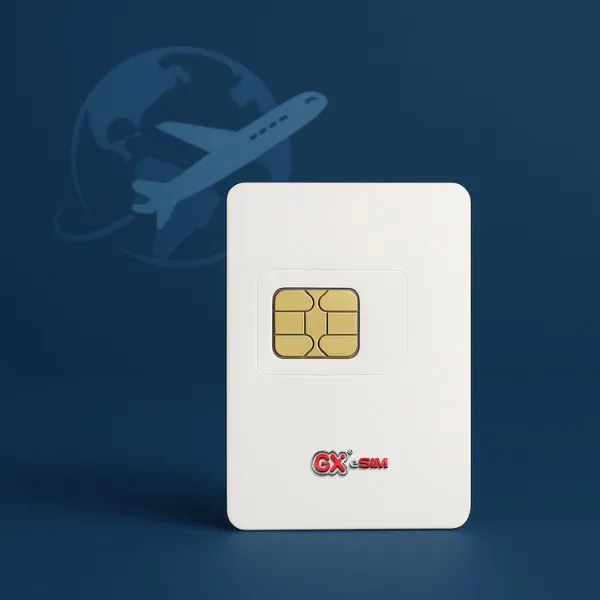
For devices that don't support eSIM technology
If your phone doesn't support eSIM, you can always order our Physical eSIM Card. It works just like a regular SIM card and can be reused for future trips.
How to Use Your Physical eSIM Card
Before your trip – install while you still have network:
- Insert the physical eSIM card into your phone's SIM slot
- Connect to WiFi or mobile network
- Scan the QR code or enter activation details provided with your data plan
- Follow on-screen instructions to complete the installation
- The eSIM profile will now be saved and ready for use Do this before you leave, while your current network is active, to ensure successful installation.
After arrival – activate your travel eSIM:
- Go to your phone's SIM settings
- Switch to the eSIM you installed earlier
- Disable your primary SIM (for safety and to avoid roaming charges)
- Make sure Roaming is turned ON for the eSIM
- Wait a few seconds – your device will connect to the local network
🌍 You're now online with GigaX eSIM!
Reuse & Top-Up Anytime
You can keep the physical eSIM card for future trips. Simply buy a new plan and reactivate it — no need to order a new one!
Shipping Note:For certain countries, delivery may take longer. We recommend placing your order at least 45 days before your trip to ensure timely arrival.
Once you have your card, you can top it up and reactivate it anytime — no need to order a new one for each trip.
(After selecting a destination, you can add a physical eSIM at checkout.)
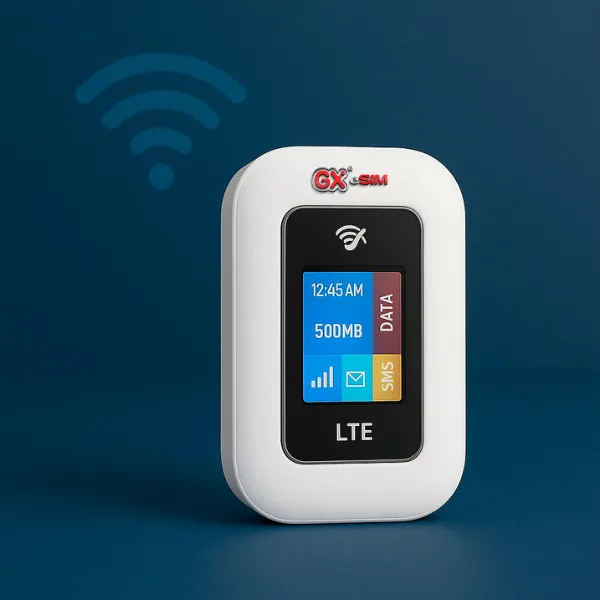
Mini Portable 4G Router - Stay Connected Anywhere
Enjoy stable, secure internet on the go. This portable WiFi router is compatible with physical SIM cards from any global operator — perfect for travelers, digital nomads, and remote workers.
Key Features
- Supports global 3G/4G networks
- Download speeds up to 150 Mbps
- Connects multiple devices via WiFi
- Built-in rechargeable battery
- WPA/WPA2 network encryption
How to Use
- Insert SIM card
- Turn on the device
- Find SSID & password inside the cover
- Connect your devices — you're online!
(After selecting a destination, you can add a physical eSIM at checkout.)
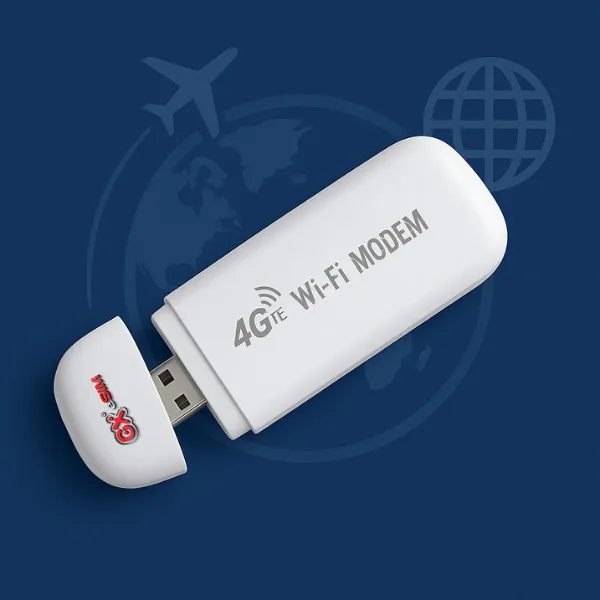
4G USB WiFi Modem – Internet in Your Pocket
A compact and powerful USB modem for quick access to mobile internet. No app, no installation — just plug in and browse!
Key Benefits
- Works with 4G LTE worldwide
- Plug-and-play – no setup needed
- Powered via USB (adapter, laptop, car, or power bank)
- Automatically creates a secure WiFi hotspot
- Connects multiple devices
- Ultra-light and portable
How to Use
- Insert SIM card
- Plug into USB power source
- Wait for signal to activate
- Connect to WiFi (SSID/password printed on device)
- Start browsing!
(After selecting a destination, you can add a physical eSIM at checkout.)
Blog.
02/01/2026
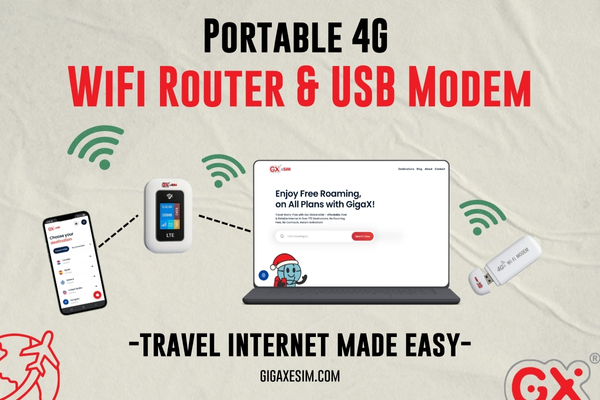
Portable 4G WiFi Router & USB Modem - Travel Internet Made Easy
Connect multiple devices anywhere with a portable 4G WiFi router and USB modem. Perfect for travelers, remote workers, and digital nomads who need reliable and fast internet on the go.
Read more
19/12/2025
10 Magical Christmas Markets In Europe: Make Your Holiday Special
What are the best Europe´s Christmas markets? Let´s explore 10 magical Christmas Europe destinations that will make your 2025 holiday season unforgettable. From the centuries-old traditions of Strasbourg to a sunny holiday in Lisboa, there is something for everyone, families, friends, couples.
Read more
08/12/2025
How To Easily Top Up Your eSIM – Anytime, Anywhere
Can you reuse and top up your eSIM? Yes you can. No need to buy a new eSIM / SIM every time you are visiting the same destination - or swap cards.
Read more
12/11/2025
Get Lifetime eSIM Discount - One Step To Travelers Endless Savings
Black Friday eSIM discount for life? With our new project that´s possible. Imagine a world where each traveler enjoys full feature eSIM with a lifetime discount.
Read more
28/10/2025
Spooky Where? Halloween Locations Out Of The Ordinary
With a wide array of Halloween events and activities available, there's something for everyone during spooky season. Where did it all begin? Let´s travel to the best 3 Halloween locations, where the roots lie.
Read more
25/10/2025
Fascinating World: 5 Amazing Facts About Asia You Need To Know, Pt. 1
Asia covers around 30% of our planet´s area and has a lot to show. From language diversity and most famous UNESCO´s heritage sites to fun days when people are celebrating Wine, Elephants or swapping socks.
Read moreWhat our clients say

"I was honestly surprised how quick it was. Bought my plan, scanned the QR code, and I was online in minutes."
Susanne,
Germany
"Internet worked the moment I landed. No roaming fees, no searching for SIM cards. Just smooth and simple."
Elena,
Barcelona
"I travelled through Austria, Hungary and Croatia with one eSIM. It worked perfectly in all three countries."
Victoria,
UK
"My phone doesn't support eSIM, so I ordered their physical card. It came on time and worked right away."
Igor,
Croatia
"Really good coverage and no hidden costs. Support was quick when I had a question. Would use it again for sure."
Paulo,
Ireland
Frequently asked questions
If you have additional questions or need personalized assistance, don't hesitate to contact our support team. Thank you for choosing GigaX eSIM for your eSIM needs!
How do I know if my phone supports eSIM?
You can check compatibility in your phone's settings. Follow our instructions to confirm:
• On iPhone: go to Settings > Mobile Data > Add eSIM.
• On Android: go to Settings > Network & Internet > SIMs or similar, depending on the model.
If the option to add an eSIM appears, your phone is compatible.
You can also refer to our step-by-step guide and list of supported devices on our website.
When will my eSIM be activated and what should I do upon arrival?
Your eSIM is activated as soon as it connects to a supported mobile network in your destination country.
We recommend installing it before you travel, while connected to Wi-Fi.
Once you land, turn off airplane mode, make sure mobile data and data roaming are enabled, and wait for the network to connect.
Will I get a phone number and SMS with the eSIM?
No. GigaX eSIM offers data-only plans.
You can still use communication apps such as WhatsApp, Viber or Messenger for calls and messages using mobile data.
Can I use my regular SIM card and eSIM at the same time?
Yes. Most modern smartphones support dual SIM functionality, allowing you to use your physical SIM for calls and SMS, and GigaX eSIM for mobile data.
What if my phone doesn't support eSIM?
If your device is not compatible with eSIM, we offer a physical eSIM card as an alternative.
Delivery is available in selected countries and must be ordered at least 45 days before your travel date.
How do I install the eSIM?
After completing your purchase, you will receive a QR code by email.
Open your phone settings, select "Add eSIM" or "Add Mobile Plan," scan the QR code, and confirm the installation.
This process usually takes under two minutes and should be done while connected to Wi-Fi.
What if I run out of data?
You can purchase a new data plan at any time through our website or application.
Can I share mobile data with other devices?
Yes. You can use your phone's hotspot or tethering function to share your GigaX eSIM data connection with laptops, tablets, or other devices.
What if the installation fails?
Ensure your phone is eSIM-compatible, unlocked, and connected to Wi-Fi.
If you continue to experience issues, contact our support team at [email protected] and we will assist you as soon as possible.
Why choose GigaX eSIM?
• Instant eSIM delivery via email
• Flexible and affordable data plans in over 170 destinations
• Optional physical eSIM card (for non-compatible devices)
• No hidden roaming fees
• Reliable and fast customer support